OpenAI Integration
jekcms supports five AI providers and uses one of them at a time. OpenAI is one of the two paid options, alongside Claude; Gemini, Groq and Cohere sit in the free-tier group. Whichever you pick becomes the provider - there is no per-feature routing table and no automatic failover to a second vendor, so this page is really about one decision and one field.
If cost is the deciding factor, read Gemini first. If output quality on complex rewrites is, OpenAI is a reasonable place to spend.
Getting a key
Sign in at platform.openai.com, open API keys and create a new secret key. Copy it immediately - the dashboard shows it once.
Add billing before you test anything. OpenAI's trial credit covers very little, and the failure mode without billing is a 429 that reads like a rate limit rather than an empty wallet.
Adding it to jekcms
Go to Settings → API & Automation. The tab opens with two cards pointing at the REST API keys screen and the n8n templates - those are for external tools talking to your site, which is a different thing from the AI keys below them.
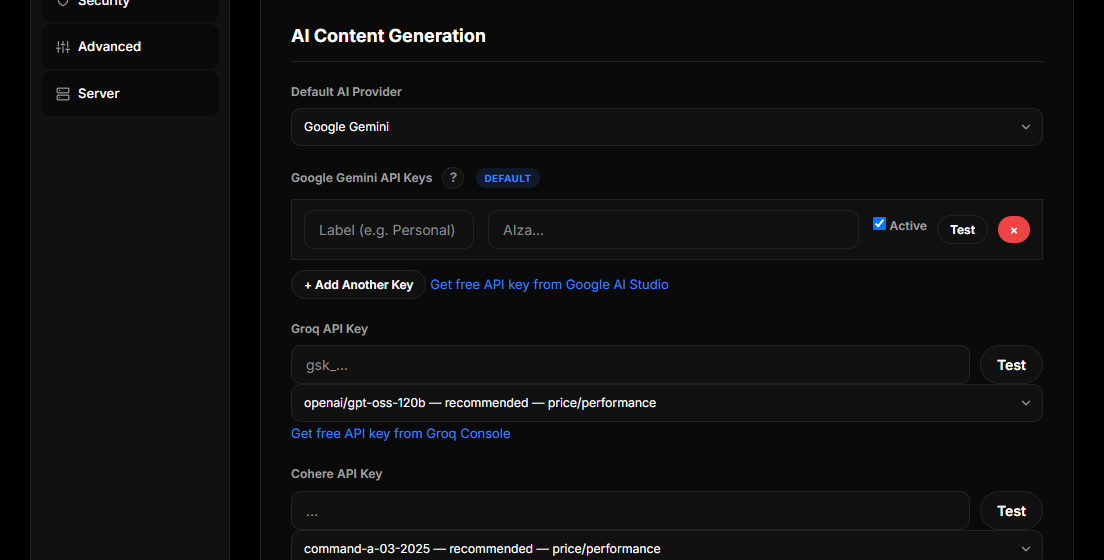
Under AI Content Generation, set the default provider to OpenAI, paste the key into the OpenAI API Key field and press Test before saving. The test makes a real call and tells you whether the key, the billing and the chosen model all work, which saves discovering the problem later inside a failed batch.
The field renders empty on every page load even when a key is stored - the plaintext is never printed back to the browser. Leaving it blank on save keeps the existing key; you only need to type something when you are replacing it.
Choosing a model
Under the key field there is a model dropdown. jekcms keeps one registry of model names for every provider and this list is generated from it, so the options you see are the current generation rather than whatever was current when the docs were written.
For OpenAI the registry offers the flagship, a pro-tier sibling, the balanced default, and the cheapest model for high-volume trivial work. The default is the balanced one, gpt-5.6-terra - the newest generation's best price-performance for blog-length text, which is what almost every jekcms feature produces. Move up to the flagship when you are doing complex rewrites or technical explanation and can feel the difference; move down to the cheapest sibling if you are generating hundreds of short strings a day.
Pick from the list rather than typing a name. A model name that is no longer served returns an error on every call, and that error surfaces as "generation failed" rather than as "your model does not exist".
What the key actually powers
AI Draft (Content Studio → AI Draft) generates a single article from a topic and a writing style, then hands it to the editor as a draft - or publishes it directly if you turned on auto-publish. It is the cheapest way to test a provider and a prompt before committing to anything larger.
In the post editor, the SEO panel runs a deep analysis of the draft and returns a score with per-check findings, the meta title and description buttons write both fields in one call inside Google's length limits, and the Brief tab turns an outline into section-by-section instructions for the writer. All three use the configured provider.
On the Posts screen, a bulk SEO analysis pass works through your archive in the background, one item per cron tick so it stays inside provider rate limits.
In the SEO Optimizer, alt text is written from real context - the post title, the focus keyphrase, the sentence surrounding the image and the file name - in batches of up to twenty images per request. This is a text call, not a vision call: the model does not see the image. Without a provider key the optimizer falls back to its filename heuristic, so nothing breaks, it just gets worse.
Trend Content uses the provider to curate raw search and trend candidates into usable long-tail topics with an angle and an intent, rather than listing raw query data.
The social plugin writes platform-specific captions and video scripts through the same provider.
What the key does not do is generate a planned batch on its own. Plan Many Posts creates the schedule; an n8n workflow with its own provider key writes the articles. See Bulk AI Generation.
Spend control
jekcms cannot see your OpenAI invoice, so it controls spend by controlling call volume. On the same tab, below the provider keys, the AI card carries a daily quota for the whole site over a rolling 24 hours, a per-user quota for a single admin or author account, and a cache lifetime so that re-running the same SEO analysis inside that window is served from cache and spends nothing. The remaining allowance for both counters is printed above the usage grid, so you can see how close you are before a batch stalls.
Two more fields shape the calls themselves. Temperature controls how conservative the output is and applies to article generation as well as analysis. Maximum output tokens caps SEO analysis and assistant calls; article generation sizes its own budget from the requested length and retries larger if the output was cut short, so this field is not the lever for short articles.
The usage grid below shows calls today, calls this week, how many were served from cache, how many errored, total tokens and average latency. There is no cost estimate - jekcms does not know your pricing tier and will not guess at one. Set a hard spend limit in your OpenAI account as well; it is the only cap that is actually enforced by the party sending the invoice.
One quirk worth knowing: the model dropdown inside that AI card lists Gemini models, and the help text under it says so. Those quota, temperature and token fields apply to every provider; the model that gets used is the one you chose under the OpenAI key above.
When something goes wrong
Rate limit exceeded. New OpenAI accounts get low per-minute caps. Wait out the cooldown shown in the message or raise your usage tier in the OpenAI dashboard. Nothing in jekcms works around this, by design - retrying harder against a rate limit makes it worse.
Invalid API key. The key was rotated, revoked, or pasted with surrounding whitespace or quotes. Re-copy it from the dashboard and press Test rather than saving and hoping.
Quota exhausted inside jekcms. The message names which counter ran out, site-wide or personal, and points at this settings tab. This is your own limit, not OpenAI's.
Generation returns nothing. Usually a token budget that is too small for the requested output. Raise the maximum output tokens field; a budget too tight to finish a response is the most common cause of a silent empty result.