n8n Workflow Setup
n8n is a self-hosted automation platform: a visual editor where you chain a trigger to HTTP calls, AI nodes and conditions. jekcms is designed to sit on both ends of that chain. It hands out work through its API and takes finished articles back, and it POSTs to your workflows when something happens on the site.
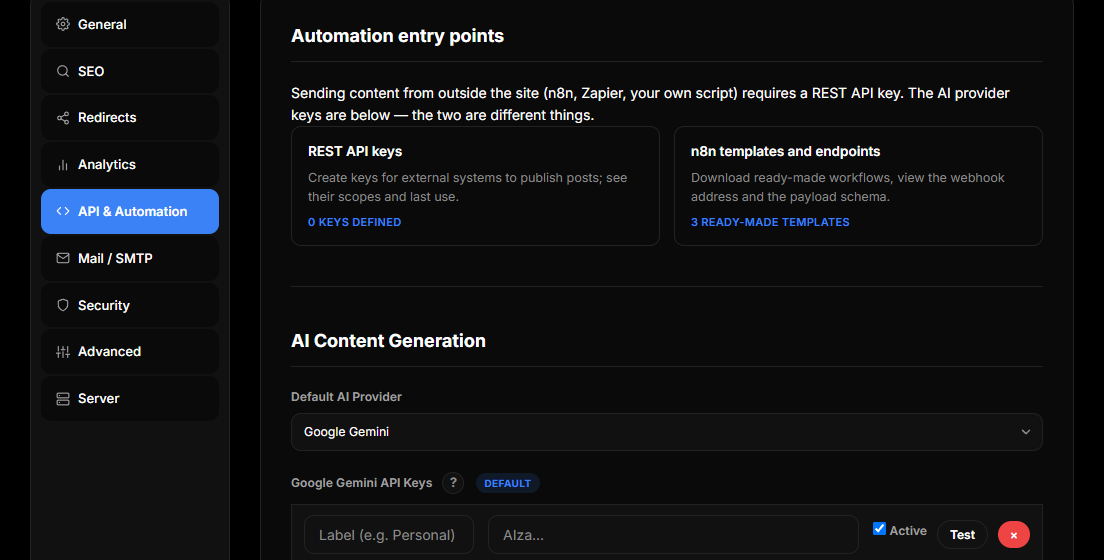
The fastest route in is not to build a workflow. jekcms ships three, already wired, with a single configuration node at the front.
Start with a shipped workflow
Open Plan Many Posts in the admin (Content Studio → Plan Many Posts) and scroll to the n8n panel. You will find the webhook address for your own site, a link to create an API key, and three downloads:
Content Queue: Persona Writer runs every two hours, pulls one task from your planned batch, writes the article in a persona voice you define, generates a cover image and publishes. Researched Production + 3 Images does the same on a four-hour cycle but researches the topic with a web-grounded call first and publishes with a cover plus two in-content images. RSS Content Factory is the different one: it reads a dozen feeds, has the model pick a candidate, checks whether you already covered it, rewrites it and publishes. Read the section on rewriting before you switch that one on.
Each downloads as a JSON file. In n8n choose Workflows → Import from File, pick it, and open the node named Ayarlar - "Settings" - at the very start. That single node holds everything you need to change: your site URL without a trailing slash, your jekcms API key, your provider API keys, the article language, your site's subject, and the persona or category list the workflow writes against. Everything downstream reads from it.
The workflow refuses to run while the placeholders are still in place, and tells you which field is unfilled. That is deliberate - a half-configured pipeline failing at node nineteen is much harder to debug than one that stops at node two.
Both the workflows and the REST API they drive are included on the free edition.
The API key
Create the key first, under Admin → API Keys. It is shown once; copy it before leaving the page.
A jekcms key carries no scopes of its own. It acts as the user it was created for, with exactly that user's role permissions. One thing to know before you plan around roles: the API Keys screen is admin-only and issues every key to the admin who is logged in. There is no user picker, so a lower-privilege key cannot be created from the panel - treat every key you issue as an admin credential. Write actions additionally require the publish_posts capability. See API Authentication for the details.
In an n8n HTTP Request node, set authentication to a header: Authorization: Bearer <your key>. X-API-Key works too, and jekcms checks several places the header might have been stripped to, because Apache and CGI setups do not reliably pass Authorization through to PHP.
The endpoints a workflow actually uses
Every call is a POST to https://yoursite.com/api/v1/webhook/{action} with a JSON body.
A queue-driven pipeline uses three. queue-pending asks for due tasks from a batch planned in Plan Many Posts and marks what it hands out as processing. content-generate sends the finished article back, attaches the featured image and closes the task. queue-fail reports a task the workflow could not complete, so it shows up red rather than vanishing.
A pipeline that sources its own topics uses publish, draft or schedule to create the post, media-base64 to upload an image it just generated, and check-source to ask whether a given source URL has already been imported - that last one is what makes an RSS workflow safe to run on a schedule without republishing the same story.
There is no queue endpoint for the content queue, which is a different pipeline. To feed that one, generate a JSON or CSV file and import it, or sync from a spreadsheet.
Webhooks documents every action, the authentication alternatives and the error responses.
Choosing what happens to the output
The endpoint your final node points at is your editorial policy.
Point it at draft and the article appears in Posts with draft status. Nothing is visible on the site until you open it, read it and publish. This is the right setting while a template or a prompt is new.
Point it at publish - or use content-generate, which always publishes because it exists to close a queue task - and the content is live the moment the workflow finishes, with nobody in the loop.
Both are legitimate. Which one you pick depends on how much editorial risk you are willing to carry, and the honest position is that automated drafts can be inaccurate, repetitive or thin; publishing them unread costs search visibility and reader trust. A sane pattern is to run a new workflow against draft for the first few dozen items, read them, and only switch that node once you have watched unattended output hold up.
Either way, the content quality gate runs at publish time. A blocked article comes back as 422 with a list of reasons - too short, no H2, duplicate title, missing featured image and so on - and is not published. Design your workflow to log that rather than treat it as a network error, because retrying the identical body will fail identically.
Rewriting other people's content
The RSS workflow exists because people ask for it, not because it is a good default. Passing someone else's article through a model and republishing it - even reworded - adds little for the reader and sits close to what search engines describe as scaled content abuse.
If you use it, make it a curation workflow rather than a copying one. Link back to the source and credit the publisher. Add what the source does not have: your own analysis, local context, an opinion, updated numbers. Route the output through draft so a person reads every piece before it goes live. And be realistic about the ceiling - a domain made mostly of rewritten feed content reads as a content farm to readers and search engines alike, whatever the workflow does in between.
Going the other way
For jekcms notifying n8n rather than the reverse, you do not need a workflow at all on the jekcms side. Open Admin → API Keys, scroll to Outgoing Webhooks, and add your n8n Webhook node's production URL with the events you care about: post published, post updated, post deleted, comment created, member registered.
jekcms POSTs a signed JSON body and records every attempt with its HTTP status, so a broken endpoint is visible in the admin rather than silent. The signature travels in X-Jek-Signature as sha256= followed by the HMAC-SHA256 of the body, keyed with the signing secret shown when you created the webhook.
Verify it in a Code node right after the Webhook node. Turn on the Webhook node's Raw Body option first - the HMAC covers the exact bytes jekcms sent, and a body that n8n has already parsed and re-serialized will not match:
const crypto = require('crypto');

const raw = $json.body;                       // raw body, as received
const sent = $json.headers['x-jek-signature'];
const expected = 'sha256=' + crypto
    .createHmac('sha256', $env.JEKCMS_WEBHOOK_SECRET)
    .update(raw)
    .digest('hex');

if (expected !== sent) {
    throw new Error('Invalid signature');
}
return [{ json: JSON.parse(raw) }];
This matters whenever the n8n webhook URL is reachable from the internet, which it usually is.
Installing n8n, briefly
If you do not already run n8n, Docker is the shortest path:
docker run -d \
  --name n8n \
  -p 5678:5678 \
  -v ~/.n8n:/home/node/.n8n \
  n8nio/n8n
Open http://your-server-ip:5678 and create the owner account with a strong password - n8n ends up holding API keys for every service you connect to it. For anything beyond local experimentation, put it behind an HTTPS reverse proxy.
One networking note that costs people an hour: if n8n runs in Docker and jekcms runs on the same host outside Docker, the site URL inside your workflow must be host.docker.internal, not localhost.
When it does not work
If the workflow reports 401, the key is not reaching PHP or it is wrong. Confirm on the API Keys screen that the key exists, is active and has not expired, and check the last_used_at column - if it never updates, the request is not authenticating at all and the header is the suspect.
If it reports 422, read the blocks array. That is the quality gate, not a bug.
If it reports 409, a post with that title or slug already exists. That is the duplicate guard doing its job, and usually means the workflow re-picked a topic it already covered - check-source in front of generation prevents it.
If jekcms is not calling your endpoint, expand the webhook row on the API Keys screen and read the delivery log. Each attempt shows the HTTP status it got back, and the Re-send button replays the exact stored body once you have fixed the receiving side.