Gemini Integration
Gemini is what a fresh jekcms install expects. It sits in the free-tier provider group alongside Groq and Cohere, and it is the only provider that gets two pieces of machinery the others do not: you can register several keys and have jekcms rotate through them, and a request that meets a busy model walks down a chain of alternatives instead of failing.
Both exist for the same reason. A free Google AI Studio key is generous but bursty, and the two things that stop it are a per-key quota and a temporarily overloaded model. Those are different problems, so jekcms handles them differently.
Getting a key
Go to aistudio.google.com, sign in with a Google account and choose Get API key → Create API key. If you already have a Google Cloud project you can attach it to that one; otherwise AI Studio creates a free project for you. The key is shown once in plaintext.
No billing setup is needed for free-tier use. Exceeding the free quota returns rate-limited responses rather than a surprise invoice - Gemini only charges once you have explicitly enabled the paid tier on the backing project. Google publishes the current limits at ai.google.dev/pricing; they change often enough that it is worth reading there rather than trusting any number written down elsewhere.
Adding keys
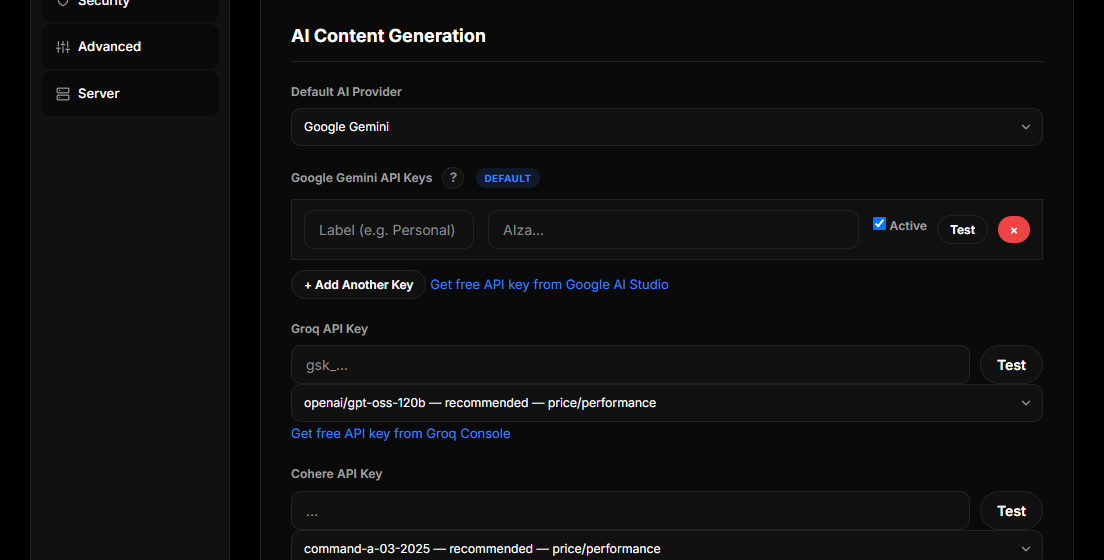
Open Settings → API & Automation and find the Gemini block under AI Content Generation. Unlike the other providers, this is a list rather than a single field. Each row takes the key itself, an optional label so you can tell them apart later, and an enabled checkbox. + Add another key adds a row.
Keys are encrypted before they are stored, and an existing row shows only a masked hint - the plaintext is never printed back into the page. Leaving a row's input blank on save keeps whatever is already stored there, so you can relabel or disable a key without re-entering it.
Press Test before saving. It makes a real call and reports back on the key and the selected model together.
Why more than one key
When a request comes back with a quota or authorization error - 429, 401 or 403 - jekcms marks that key as unavailable for the moment and immediately retries with the next enabled one. To whatever was calling, nothing happened: the generation simply succeeded.
This is what makes a free key practical for a working site. One key's daily allowance is a ceiling you will hit during a bulk run; three keys is three ceilings, and the rotation is automatic rather than something you notice and fix.
Disabling a row rather than deleting it is the right move when a key starts misbehaving - it stays in the list, labelled, and you can bring it back with a checkbox.
Choosing a model
The AI Integration card further down the same tab holds Gemini's model dropdown, grouped into three sets.
The latest generation group holds the current flash models, newest first, ending in a lightweight sibling for high-volume trivial work. The default is the newest flash, gemini-3.8-flash - the best price-performance in the current generation for blog-length text. Gemini Pro holds the higher-quality, slower option for complex rewrites. The automatic group holds Google's own moving aliases, which always resolve to whatever Google currently considers the latest flash or pro model.
Every entry in this list was probed against the live API. A model can be listed in Google's documentation and still answer 404, so jekcms only offers names that actually responded. If you have a saved model that has since been retired, it stays visible in a custom group so you can see what needs replacing rather than having it silently swapped underneath you - and jekcms rewrites a handful of known-retired names to their current equivalents on the way through, so an old install keeps working after an upgrade.
Do not type a model name in by hand. The registry is the single source of truth for every provider in the product, and a name outside it is a name nobody has tested.
The fallback chain
Quota is one failure mode; load is another, and they need opposite responses.
When the newest flash model answers 503 with a "high demand" message - measured repeatedly on free keys, sometimes on three models at once - rotating keys would not help, because the key is fine. So jekcms keeps the same key and walks down a chain of models instead: the one you configured, then the stable flash of the previous minor generation, then Google's flash-latest alias, and finally the previous major generation as an emergency exit.
The result is that you get the newest model whenever Google is serving it and a working answer when it is not. The user never sees a 503. This behaviour applies to Gemini only; the other four providers call the model you selected and return whatever comes back.
Worth internalising: load is not an error. A 503 from the newest flash model does not mean your key is broken or your model choice is wrong, and it does not need a bug report.
Models jekcms picks for itself
Beyond the model you choose for text, a few jobs are pinned to specific Gemini models because the right answer is not the same one.
Cover and in-content image generation uses the current flash image model, with a lighter sibling for quick passes. Text-to-speech for audio articles uses the flash TTS model. One-sentence helper calls - the visual brief for an image, for instance - use the lightweight model rather than burning a full flash call on a single line.
The one that surprises people is search grounding. Competitor research and other grounded lookups are pinned to the previous generation's flash model, because on free keys the current generation answers 429 for every grounded request - measured across eighteen keys. That pin is deliberate, and it is why grounded features keep working on a free key when the newest model would not.
What the quota fields do
The daily quota, per-user quota, cache lifetime, temperature and maximum output token fields on the same card are jekcms's own limits, applied to every provider, not just Gemini. They exist so a runaway loop or an over-enthusiastic author cannot burn through your allowance, and the remaining allowance for both counters is printed above the usage grid.
Cache lifetime is the quietly valuable one on a free key: repeating the same SEO analysis inside that window costs nothing at all, because it never reaches Google.
When something goes wrong
API key not valid. Almost always a copy-paste problem - trailing whitespace, or only part of the key. Re-copy from AI Studio and press Test.
Resource has been exhausted. The key hit a per-minute or per-day quota. Add a second key so rotation can cover it, wait for the reset, or enable the paid tier on the Google Cloud project behind the key.
Everything is slow but nothing fails. That is the fallback chain working. Check which models are being reached before changing anything; a burst of "high demand" on the newest model resolves itself.
Alt text quality is disappointing. Alt text is written from context - the post title, the focus keyphrase, the sentence around the image and the file name - not from looking at the picture, and it goes out in batches of up to twenty images per request. If the results read as generic, the fix is usually a more specific focus keyphrase on the post, or a model one tier up.