Theme Management

Themes control the front-end look of your site — templates, CSS, typography, layout. The themes panel lives under Appearance → Themes (admin/themes.php). One theme is active at a time; switching is safe and reversible.

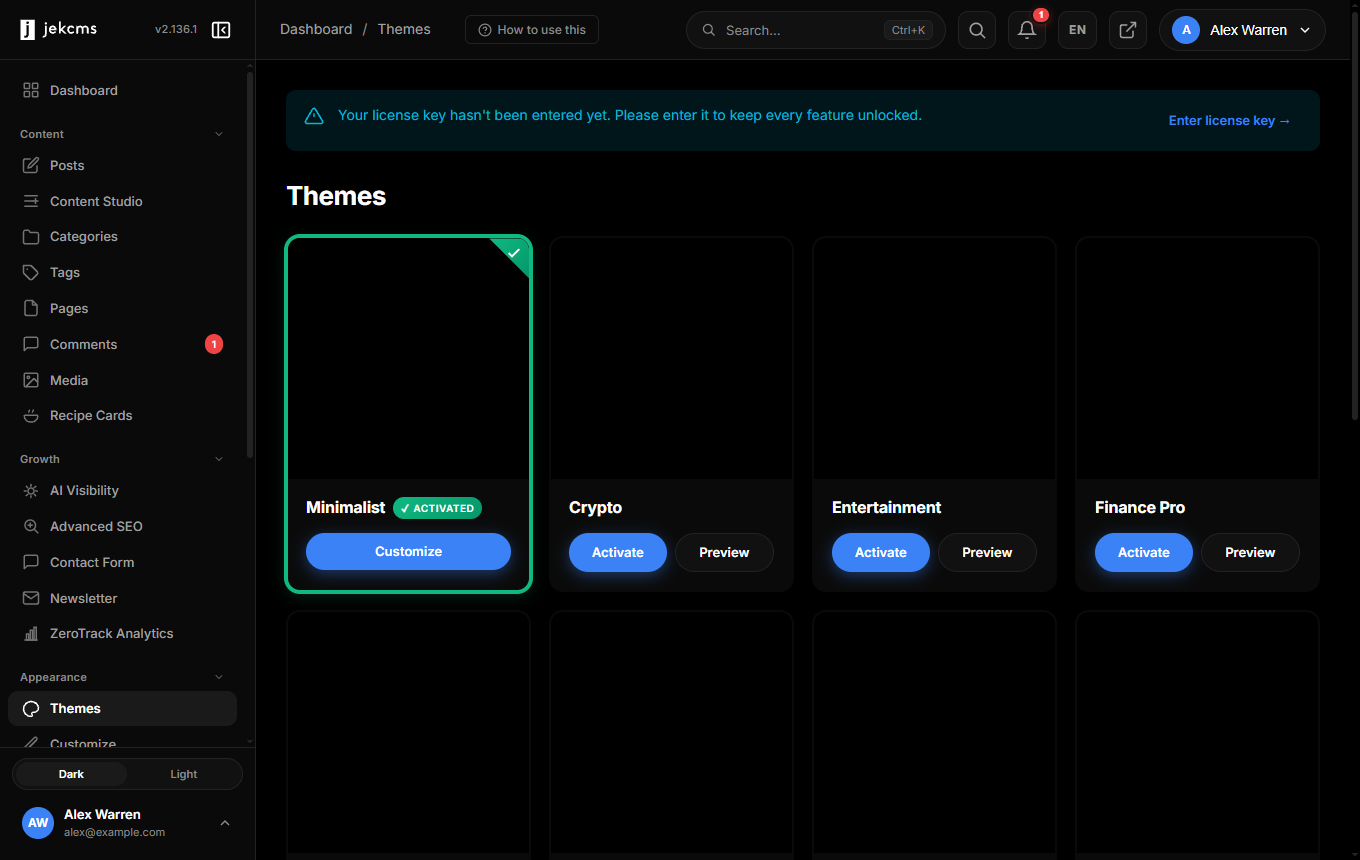
The themes panel

Each installed theme shows as a card with:

  • Screenshot — Pulled from the theme's screenshot.png
  • Name, version, author
  • Active badge — On the currently applied theme
  • Actions — Activate / Customize / Preview / Delete

The active theme's card is pinned to the top with a prominent border; inactive themes follow in install order.

Installing from ZIP

Click Upload Theme (top-right) and pick a .zip from your disk. The ZIP must contain a top-level directory with at least theme.json and index.php:

my-theme.zip
└── my-theme/
    ├── theme.json
    ├── index.php
    ├── style.css
    └── screenshot.png

On upload, jekcms:

  1. Validates the ZIP (no path traversal, size under 20 MB, required files present)
  2. Extracts to themes/{slug}/
  3. Reads theme.json for metadata
  4. Checks license gating (see Premium themes below)

Themes that fail validation show a specific error ("missing theme.json", "invalid PHP syntax in index.php", etc.).

Switching the active theme

Click Activate on any card. jekcms:

  1. Updates settings.active_theme in the database
  2. Bumps the CSS cache-bust token (theme_cache_version) — this forces every visitor's browser to fetch fresh CSS instead of serving a stale cached version
  3. Clears the rendered-page cache (if Settings → Performance → Cache TTL is set)
  4. Rebuilds the menu structure if the new theme declares different menu locations

Expect a 1–2 second delay on the first page load after switching while caches warm. No downtime, no rebuild step.

If the new theme's theme.json declares menu locations that the old theme didn't, you'll see a prompt to assign existing menus to the new slots.

Customize

Appearance → Customize opens a split-screen editor: live site preview on the right, controls on the left. What's controllable is declared in the theme's theme.json under the customizer key. Typical panels:

  • Colors — Primary, accent, background, text. Color pickers with hex input
  • Typography — Heading font, body font, size scale. Google Fonts auto-imported when picked
  • Layout — Sidebar on/off, content width, header style
  • Header & Footer — Logo upload, tagline visibility, footer text/HTML
  • Homepage — What the homepage shows (latest posts / a specific page / a custom grid)

Changes preview live. Save commits them; Discard reverts. Customizations are stored per-theme under theme_options.{theme_slug} so switching themes doesn't lose them — switching back restores prior customizations.

Child themes (theme overrides)

jekcms doesn't have a formal child-theme system. Instead, any file in sites/{slug}/themes/{theme_slug}/ overrides the matching file in themes/{theme_slug}/ at runtime.

Practical examples:

  • Override themes/nova/templates/post.php by creating sites/mysite/themes/nova/templates/post.php
  • Override only the header partial: sites/mysite/themes/nova/partials/header.php
  • Add extra CSS without touching the theme: sites/mysite/themes/nova/style-custom.css (loaded after the theme's own style.css)

This keeps upgrades safe — themes/nova/ can be replaced wholesale when a theme update ships, and your site-specific overrides survive untouched.

Preview mode

Click Preview on any non-active theme. jekcms serves that theme to your session only while all other visitors continue seeing the active theme. A banner at the top of every page says "Previewing: Nova — [Exit Preview]".

Preview is ideal for:

  • Testing a new theme before activating
  • Demoing options to a client without changing their live site
  • Verifying that a plugin's theme hooks work correctly with the new template

Preview sessions expire after 2 hours or when you click Exit Preview.

Removing a theme

Delete on any card removes the theme's files from themes/. Protections:

  • You can't delete the currently active theme (activate a different one first)
  • Per-theme customizations remain in the database for 30 days after deletion in case you reinstall
  • Deleting doesn't touch sites/*/themes/{slug}/ overrides — manual cleanup if you want those gone too

Premium / license-gated themes

Some bundled themes require an STD tier license or higher. On free/FRE tier, these themes:

  • Appear in the panel with a Locked badge
  • Can be previewed (with a watermark overlay)
  • Cannot be activated (Activate button disabled with "Upgrade to STD" tooltip)

Upgrading the license immediately unlocks them — no reinstall needed. License status is checked on activation, so a downgraded license will force the site back to a free theme on the next theme switch (your content and settings survive).

Be the first to know

New features, release notes & CMS guides — a couple of emails a month, no spam.