Settings Panel
Settings is the widest screen in the admin, and that is the problem with it: nine tabs, each with several sections, and no indication of which ones matter on day one. This page walks the tabs in the order they appear and tells you which ones you can safely ignore.
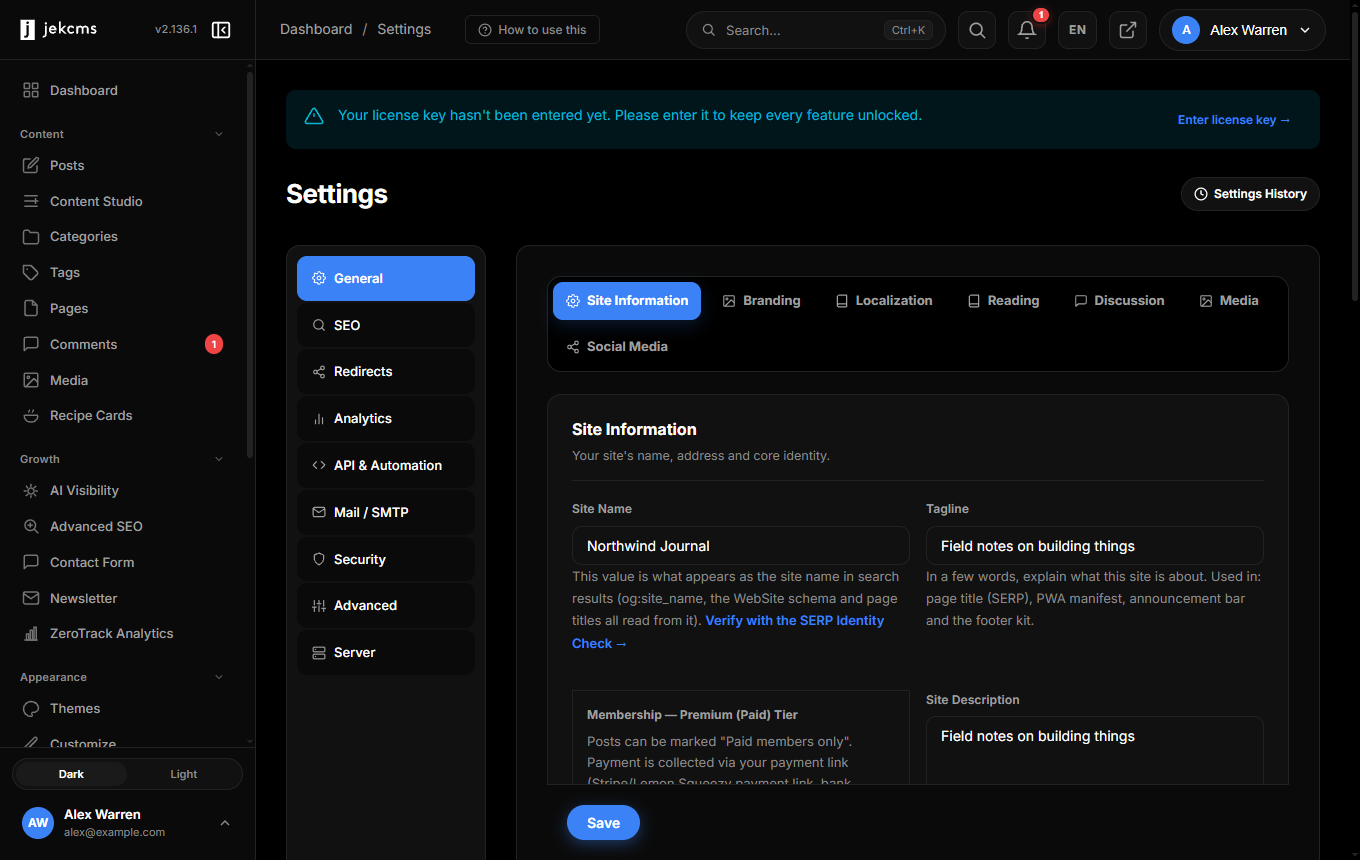
Everything saves per tab. There is no global save button waiting to catch unsaved work in another tab, so finish a tab before you move on.
General - the only tab you must visit
It opens on Site Information, and the first field on it does more than name your site.
Site Name is not decoration. It feeds og:site_name, the WebSite schema and your page titles - which is to say, it is what Google reads when it decides what to call you in search results. The field carries a link to the SERP Identity Check so you can confirm what actually resolves on the live site rather than trusting the input box.
Tagline goes into the page title, the PWA manifest, the announcement bar and the footer. A few words about what the site is, not a slogan.
The rest of General is grouped into six more sections, and most installs touch two of them:
Branding - logo and favicon. Localization - site language, admin language (they can differ), timezone and date format. Timezone matters more than it looks: scheduled posts fire against it.
Reading decides how many posts appear on the homepage and in archives. Discussion holds the comment rules - whether comments are open, whether they need approval, how the spam filter behaves. Media carries the image quality settings for WebP and AVIF conversion. Social Media is the link set that feeds your footer icons and the follow strip.
General also holds the membership tier settings, which surprise people by being here rather than under a plugin. If you mark posts as paid-members-only, this is where you set the price label and the payment link. Payment itself happens at your provider - Stripe, Lemon Squeezy, a bank transfer note, whatever you use. Paste a webhook signing secret and members flip to Premium automatically when a payment clears; leave it empty and you mark them by hand on the Users screen.
SEO - set it once
Sitemap options, robots rules, AI crawler policy, and the thresholds that decide whether thin category and author archives get indexed at all.
The robots rules here are what the live /robots.txt is built from. If you change the AI crawler policy - allowing or blocking GPTBot, ClaudeBot and the others - this is the screen that does it. Save the tab and the file is regenerated.
One thing worth knowing: if a physical robots.txt file exists on your server, it can win over the one jekcms generates. The SEO Status screen checks for exactly that and tells you if your policy is not reaching the live file.
Redirects, Analytics, Mail
Redirects is a manager, not a settings tab - 301s, 302s, 410s and a 404 log you can convert into redirects with one click. It earns a visit after a migration, not before.
Analytics connects Google Analytics and Search Console, or turns on ZeroTrack if you would rather not send visitor data anywhere.
Mail / SMTP is worth ten minutes on day one. Password resets, comment notifications and newsletter sends all leave through it. PHP's built-in mail function works on some hosts and silently fails on others; SMTP credentials from your host or a sending service are the difference between "I never got the email" and a working site.
API & Automation, Security, Advanced, Server
These four are where you go when something specific sends you.
API & Automation holds API tokens, webhook targets and the scheduled-task settings. Security covers login attempt limits, two-factor and the file-integrity guard. Advanced carries maintenance mode, the cache controls and the debug switches - it is also where you turn the site off to visitors while you work on it.
Server is read-only: PHP version, extensions, memory limit, disk space. Nothing to configure, but it is the first screen to open when a feature misbehaves, because a missing extension explains more problems than any log file.
Settings History
Next to the tab row there is a link labelled Settings History. Every change is recorded with who made it, the old value, the new value and a timestamp - and you can undo any of them. If a site starts behaving differently and nobody remembers changing anything, start here.