News Publishers
Getting a site into Google News, Apple News or Microsoft Start takes more than one submission. This screen covers twenty-two platforms, each with its own form and review queue, and answers often arrive weeks later. A common problem is losing track of which applications you have already sent.
This screen is a register. Every platform has a card with a status you set yourself, the account URL or channel ID you received, and a notes field. The screen does not submit applications for you, because the platforms have no API for that. It keeps a record, so weeks later you still know the state of each application.
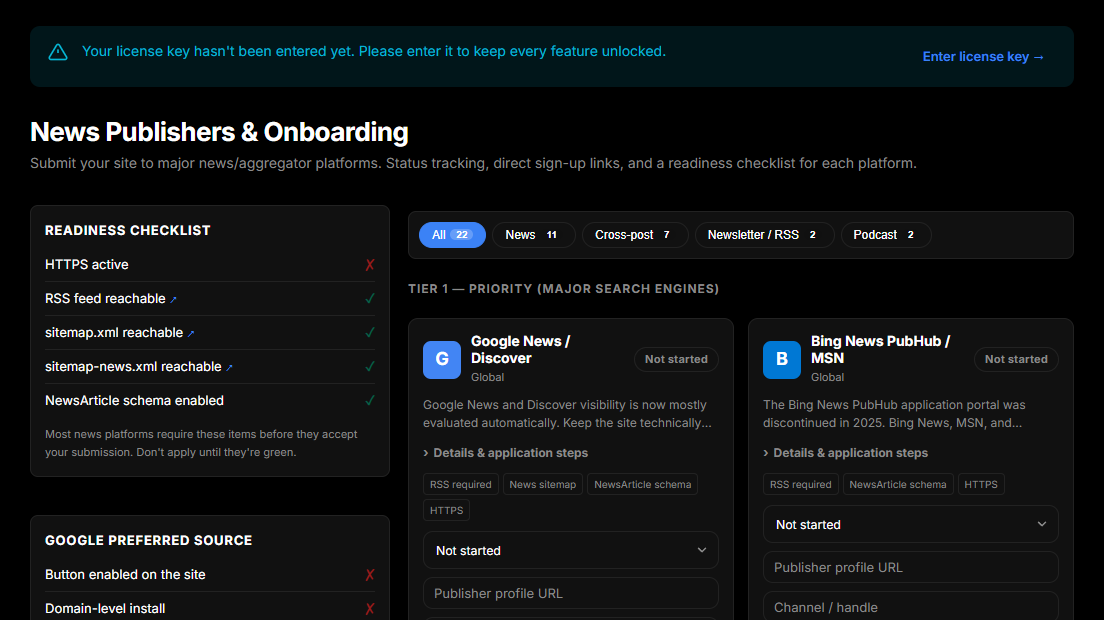
Check readiness before you apply
The panel on the left reads five things from your live site:
| Check | What it looks at | |---|---| | HTTPS active | Whether your site URL is served over HTTPS | | RSS feed reachable | Your feed responds | | sitemap.xml reachable | Your standard sitemap responds | | sitemap-news.xml reachable | The news-specific sitemap responds | | NewsArticle schema enabled | The setting that marks your posts as news articles |
Most news platforms require these before they will accept a submission. After a rejection, some platforms ask you to wait months before you apply again, so wait until all five checks are green.
The news sitemap and the NewsArticle schema are the checks that most often fail. Both are switched on in Settings → SEO.
The three tiers
The cards are grouped by how much traffic each platform is likely to bring:
Tier 1 - Priority. Google News, Microsoft Start, Apple News and Flipboard. These bring the most traffic. They also take the longest to review, so apply to them first.
Tier 2 - Expansion. Aggregators and cross-posting destinations: SmartNews, NewsBreak, Techmeme, NewsNow, Substack, Medium, LinkedIn newsletters, dev.to and others. They accept sites faster and each brings less traffic, but together they add up.
Tier 3 - Community and social. RSS readers (Feedly, Inoreader) and, if you publish audio, the podcast directories (Spotify for Podcasters, Apple Podcasts). These usually list a site without a review.
Each card has a status you set by hand (Not started, Submitted, Approved, Rejected), because only you see the platform's reply.
Publisher details
Several platforms ask for the same details during review: a publisher name, a logo, an editorial policy, a corrections policy, an about page and a contact address. The form on the left stores them once.
Two of these have a Create button beside them. If you have no editorial policy or corrections policy page, jekcms will generate one as a draft page on your site so you have something to link. Read and edit it before you publish it, because it is only a first draft. Reviewers read these pages.
Publishers most often skip the corrections policy. It states how you fix or retract a post when it turns out to be wrong. News platforms look for it specifically. If you would rather not maintain a separate page, link the relevant section of your editorial policy instead.
Google preferred sources
Separate from the applications, this screen also tracks Google's preferred sources feature. When a reader picks your site as a preferred source in Google Search, your posts carry a badge in Top Stories.
The panel shows whether the button is enabled on your site, whether your install sits at the root of a domain (a site in a subdirectory is not eligible), and how many times the button has been clicked. jekcms counts these clicks itself, because Google does not report them.
The button does not make a site eligible. Eligibility follows Google's News content policies and the readiness list above. Use the Search the source tool link to check whether Google already lists your domain.
Related
- Settings → SEO: news sitemap,
NewsArticleschema, robots rules - SEO Status: whether search engines can reach your site