Migrating from Ghost, Substack, Medium & Blogger
Besides WordPress, jekcms has importers for four other platforms, all under Admin panel → Import. Each one reads the platform's own export file, so you do not need database access or an API key on the old site.
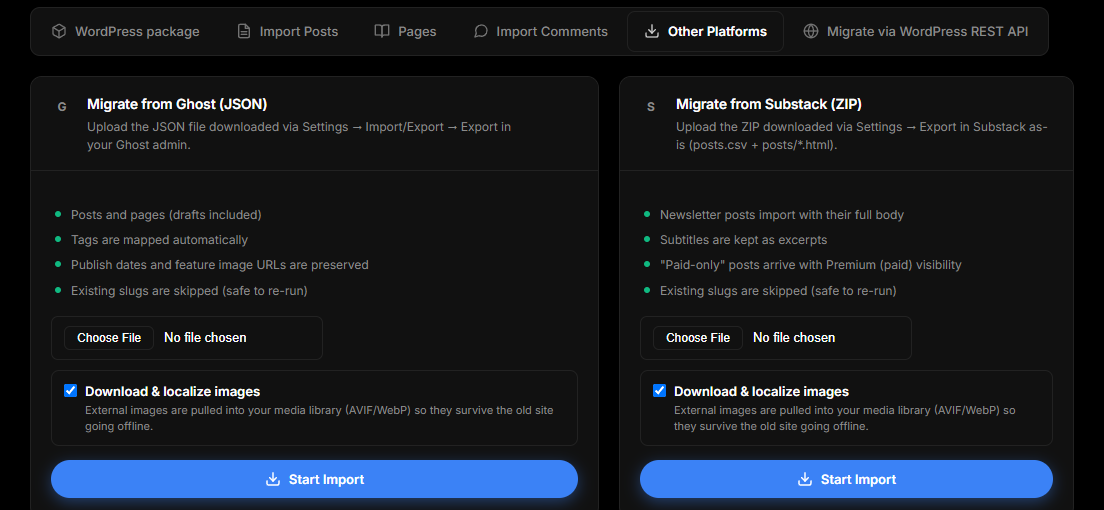
All four importers share the same behavior:
- Every post passes through the normal jekcms publishing pipeline: slug uniqueness, excerpt, reading time, and the audit trail work exactly as if you had written the post in the editor.
- Imported HTML is sanitized before it is stored.
- Download & localize images (checked by default) downloads every image referenced in the content into your media library, converts it to AVIF and WebP, and rewrites the post body to point at the local copies. Your images stay available after the old site goes offline.
- Re-running an import is safe: a post whose slug already exists is skipped instead of duplicated.
- When it finishes, you get a count of imported posts and pages, skipped duplicates, and up to ten per-post error messages if anything failed.
Ghost
Export: in your Ghost admin, go to Settings → Import/Export → Export and download the JSON file. Ghost 4 and 5 both work; if Ghost hands you a ZIP with the JSON inside, upload the ZIP as-is.
Upload it at: Admin panel → Import → Migrate from Ghost (JSON).
What comes across: posts and pages, drafts and published states with their original publish dates, tags, custom excerpts, feature images, and post visibility. Ghost's members and paid posts get the matching jekcms membership visibility, so paywalled posts stay behind the paywall.
One limit: Ghost 5 can store a post's body only in its internal "lexical" format. jekcms imports the HTML body that Ghost exports alongside it (present in normal exports); a post with no HTML body at all is imported as a draft rather than published empty.
Substack
Export: in Substack, go to Settings → Export and download the ZIP. Upload it unchanged; jekcms finds posts.csv and the posts/*.html files inside it.
Upload it at: Admin panel → Import → Migrate from Substack (ZIP).
What comes across: posts with their publish state and dates, subtitles (imported as excerpts), and slugs taken from the original Substack URLs. Posts marked paid-subscribers only are imported with paid visibility, so they work with the jekcms membership system right away. Substack has no separate cover-image field; with image localization on, the first image in each post becomes its featured image.
Your subscriber list is not part of the content export. Export it separately from Substack and invite readers to your new site's membership.
Medium
Export: in Medium, go to Settings → Security and apps → Download your information and download the ZIP Medium emails you. Upload it as-is; jekcms reads the posts/*.html files inside.
Upload it at: Admin panel → Import → Migrate from Medium (ZIP).
What comes across: published stories and drafts (Medium marks drafts in the export, and they stay drafts), original publish dates, subtitles as excerpts, and clean slugs. The random hex ID that Medium adds to every URL is removed, so my-story-3f2a91bc04d1 becomes my-story. With image localization on, the first image becomes the featured image.
Medium's export does not include tags, so topics and tags do not come across. Plan to assign categories after the import.
Blogger
Export: in Blogger, go to Settings → Back up content and download the .xml file. A Google Takeout ZIP containing that XML is accepted too.
Upload it at: Admin panel → Import → Migrate from Blogger (XML).
What comes across: posts and pages, drafts and published states with original dates, and Blogger labels, which become jekcms tags. Slugs are taken from the last segment of each post's original URL, so /2023/05/my-post.html becomes my-post.
What none of these importers carry
Check this list before you start:
- Comments. None of the four platform importers moves comments. (The WordPress Migrator plugin is the only path that carries comments.)
- Authors. Every imported post is assigned to the admin account doing the import. On a multi-author site, reassign authors afterwards from the post list.
- Members and subscribers. Paid/member visibility is preserved (Ghost, Substack), but the member accounts are not. Export your audience from the old platform and bring them into the jekcms membership system separately.
URLs and redirects
These importers keep the old slug wherever the export makes it recoverable, which covers most links if your old URLs were domain.com/slug. None of them generates a redirect map. If your old platform used dated paths (Blogger's /2023/05/post.html, Substack's /p/slug), set up 301 redirects in the jekcms redirect manager after the import, and watch the built-in 404 log for the ones you missed.
After the import, regenerate your sitemap and submit it in Search Console. Then go through the pre-launch checklist before switching DNS.