Migrating from WordPress
jekcms gives you three ways to bring a WordPress site across. All of them handle images, and all of them are honest about their limits.
Coming from somewhere else? Ghost, Substack, Medium and Blogger have their own importers.
Start with the plugin. The other two paths predate it and remain useful when you cannot install anything on the WordPress side.
jekcms does not read WordPress's XML export file. There is no drag-and-drop of yoursite.wordpress.xml. What exists is described below - and it is enough to move a large site.
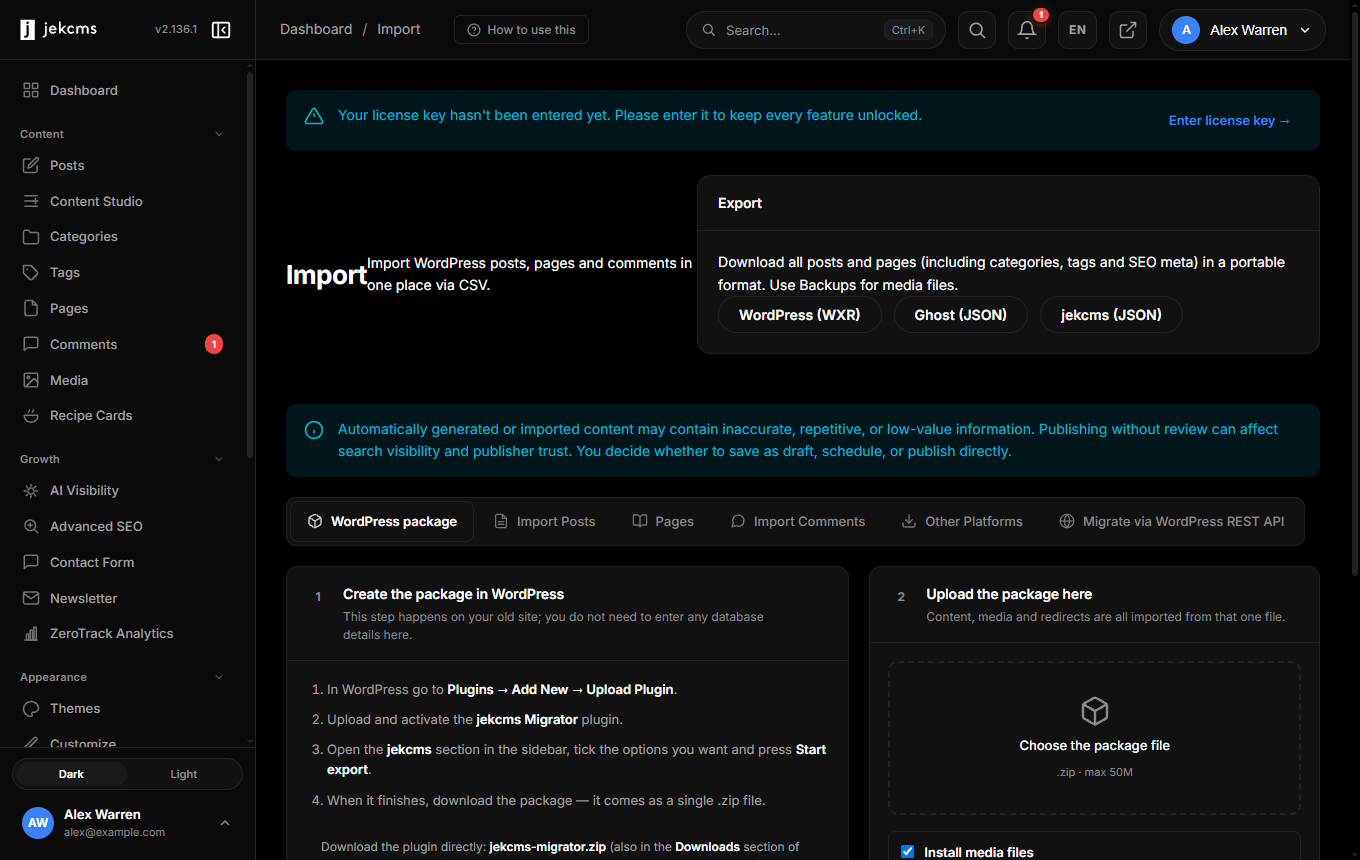
Path 1 - the jekcms Migrator plugin (recommended)
A small WordPress plugin packs your whole site into a single .zip, which you then hand to jekcms. It is the shortest route and the only one that carries menus, comments and SEO fields across on its own.
Download: jekcms-migrator.zip - GPL-2.0-or-later, works on WordPress 5.6+ / PHP 7.4+.
Installing it
The plugin is distributed as a zip you upload yourself. You do not need it to be listed in the WordPress plugin directory:
- In your WordPress admin, go to Plugins → Add New → Upload Plugin.
- Choose the
jekcms-migrator.zipyou downloaded and press Install Now, then Activate. - Open Tools → jekcms Migrator and press Start export.
- When it finishes, download the package it produced.
The export runs in batches and saves its progress, so sites with thousands of posts finish without hitting PHP time limits. No database host, user or password is involved, and nothing connects from server to server - which matters, because most shared hosting blocks that anyway.
Bringing the package into jekcms
Two entry points, one engine, identical rules. On a new install the setup wizard offers a third scenario, Import a WordPress package. On an existing site the same thing lives at Admin panel → Import → WordPress package.
What the package carries
Posts, pages and drafts; the category tree with its parent-child structure; tags; authors with their bios; approved comments; menus; media files; SEO titles and descriptions from Yoast, Rank Math or All in One SEO; and a redirect map from every old URL to its new address. Old WordPress URLs are installed as 301 redirects during the import, so links in search results and on other sites keep working.
Path 2 - SQL → CSV (when you cannot install a plugin)
The Migration Wizard hands you a ready-made SQL query. You run it against your WordPress database, export the result as CSV, and upload that CSV to jekcms.
- Open Migration Wizard in the jekcms admin and copy the SQL query it shows you.
- Run it in phpMyAdmin (or any MySQL client) on your WordPress database.
- Export the result as CSV.
- Upload the CSV back in the wizard.
The query already pulls titles, slugs, content, excerpts, status, publish dates, author name/slug/email, the featured image URL (resolved through _thumbnail_id), and comma-joined categories and tags.
This path is deliberately plain rather than clever: it works on any host, it needs no plugin on the WordPress side, and it never asks your live site to stream thousands of records over HTTP.
Path 3 - WordPress REST API (the quick one)
If the source site exposes /wp-json/wp/v2/posts, jekcms can pull posts straight over the REST API, page by page, with embedded author and media data. No database access needed - just the site URL.
This is the fastest way to move a small or medium site, and the easiest when you do not have database credentials.
What happens to images
Both paths run the same image pipeline: every image referenced in the content - and the featured image - is downloaded from the source URL, stored locally, and converted to AVIF and WebP alongside the original. The content is rewritten to point at the local copies, so the old domain stops being a dependency the day you switch DNS.
Images that fail to download are logged rather than silently dropped. A broken image on the old host stays broken, and you are told which ones.
What does not come across
Be honest with yourself about this part before you start:
- Plugin shortcodes. jekcms does not run WordPress plugins, so
[some_plugin]in the body stays as text until you replace it. - Page-builder markup. Elementor/Divi/WPBakery output is a nest of builder-specific
divs. It imports as HTML, but it will not look the same and it will not be editable the way it was. - Custom fields. Arbitrary ACF structures have no automatic destination. Map them into the content or into post meta yourself.
- Comments. Import them separately if you need them; the post import does not carry them.
URLs and redirects
The Migrator package carries a redirect map and installs it during the import, so paths 1 needs nothing from you here.
On paths 2 and 3, if your permalink structure changes you need 301 redirects from the old URLs to the new ones and jekcms does not generate them for you. It gives you a redirect manager to enter them (individually or in bulk), and it logs 404s so you can catch the ones you missed instead of guessing.
Regenerate your sitemap after the import and submit it in Search Console.
A sane order of operations
- Import into a staging install first and read a dozen posts end to end.
- Fix category/tag naming before you import for real - taxonomy cleanup is far cheaper before content lands.
- Import, check the images, then set up redirects.
- Switch DNS. Keep the WordPress box alive, read-only, for a couple of weeks. You will want it.