Webhooks
jekcms talks to outside tools in both directions, and the two directions are configured in completely different places.
Inbound is the automation API: an external workflow POSTs a finished article, an image, or a status query to your site, and jekcms acts on it. Nothing is registered in advance - you create an API key and start calling endpoints.
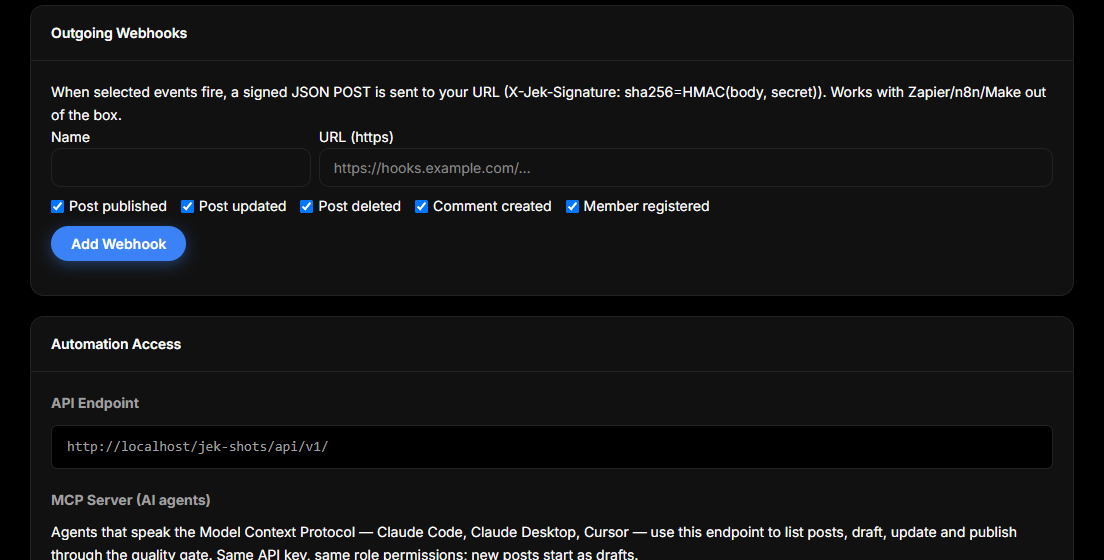
Outbound is the notification side: you register a URL under Admin → API Keys, pick the events you care about, and jekcms POSTs a signed JSON body to that URL whenever one fires.
Both live on the same screen in the admin - admin/api-keys.php - because both start with a credential.
Inbound: the webhook endpoints
Every call is a POST to https://yoursite.com/api/v1/webhook/{action} with a JSON body.
The content actions are publish (create and publish immediately), schedule (create with a future publish date), draft (create a draft), update, and delete. Media arrives through media (fetch from a URL) or media-base64 (raw data, which is how workflows hand over an image they just generated). For batches there are bulk-publish and bulk-import.
The rest are the ones that make a workflow safe to re-run: check-source tells you whether a source URL has already been imported, status returns a post's current state, ai-enhance fills in AI metadata for existing content, and test is a connectivity ping that answers n8n webhook connection successful without touching your database.
Four more exist specifically to drive a batch created in Plan Many Posts: queue-pending hands out due content_generation tasks (and marks them as processing), content-generate posts the finished article back and closes the task, and queue-complete / queue-fail report the outcome when your workflow finishes or gives up. pinterest-feed is the odd one out - a read-only JSON feed of recently published posts with pin-ready title, description and hashtags, for tools that pin on your behalf. It does not call Pinterest itself.
An unknown action returns 400 with the full list of valid ones in the error message, which makes typos self-diagnosing.
Authentication
An API key is enough, and it is what you should use. Create one under Admin → API Keys, then send it as Authorization: Bearer <key>; X-API-Key and Api-Key are accepted too, because Apache and CGI setups do not always pass the Authorization header through to PHP and jekcms checks every place it might have ended up.
Keys are stored as SHA-256 hashes, so a leaked database does not hand over working credentials. A key carries no scopes of its own: it acts as the user it was issued for, with exactly that user's role permissions. One consequence of how the screen works is worth knowing before you plan around roles: Admin → API Keys is admin-only, and it issues every key to the admin who is logged in. There is no user picker, so you cannot create a lower-privilege key from the panel. Treat every key you issue as an admin credential. The write actions - everything that creates, changes or deletes content - additionally require the publish_posts capability, so a subscriber-level key is refused outright.
There is a second mechanism in the code, and it is worth being clear about because the obvious reading of it is wrong. handleWebhook() will verify an HMAC signature - X-Webhook-Signature or X-N8N-Signature, carrying the HMAC-SHA256 of the raw body keyed with N8N_WEBHOOK_SECRET - but only when the request arrived with no authenticated user. Authentication runs first for every request and refuses an unauthenticated one with 401 before the webhook handler is ever entered, so that branch is not reachable today. A signature does not replace the API key. Send the key; sign as well if your tooling wants to, but do not build a flow that relies on signing alone.
$body = json_encode(['title' => 'Hello', 'content' => '...']);

$ch = curl_init('https://yoursite.com/api/v1/webhook/draft');
curl_setopt_array($ch, [
    CURLOPT_POST           => true,
    CURLOPT_POSTFIELDS     => $body,
    CURLOPT_RETURNTRANSFER => true,
    CURLOPT_HTTPHEADER     => [
        'Content-Type: application/json',
        'Authorization: Bearer ' . getenv('JEKCMS_API_KEY'),
    ],
]);
echo curl_exec($ch);
const body = JSON.stringify({ title: 'Hello', content: '...' });
await fetch('https://yoursite.com/api/v1/webhook/draft', {
method: 'POST',
headers: {
'Content-Type': 'application/json',
Authorization: `Bearer ${process.env.JEKCMS_API_KEY}`,
},
body,
});import json, os, requests
body = json.dumps({'title': 'Hello', 'content': '...'})
requests.post(
'https://yoursite.com/api/v1/webhook/draft',
data=body,
headers={
'Content-Type': 'application/json',
'Authorization': 'Bearer ' + os.environ['JEKCMS_API_KEY'],
},
)Send the body as the exact bytes you serialized. Serialize once and transmit that string; re-encoding it in between is the cause of nearly every "it works in my terminal but not in my workflow" report.
What comes back
A successful content call returns the created post's id, slug and URL. Two failure responses are worth designing your workflow around.
422 with {"success": false, "error": "quality_gate", "blocks": [...]} means the content quality gate refused to publish. Each block carries a code - short_content, short_title, duplicate_title, similar_content, no_h2, no_featured_image, no_internal_link, broken_local_image, and a few more - plus a human message in both languages. This is not a transport error: retrying the identical body will fail identically. Fix the content or send it as a draft instead.
409 means a post with that title or slug already exists, which is what stops a re-run of the same workflow from duplicating everything.
Requests are also rate-limited per IP over a rolling hour, so a runaway loop hits a wall rather than your database.
Keeping a human in the loop
The endpoint you target is the editorial policy. Send to draft or schedule and the content lands in the admin as a normal draft; nothing is public until an editor publishes it, and the quality gate runs at that moment instead. Send to publish or content-generate and it goes live as soon as the call returns.
Note that content-generate always publishes - it has no draft mode, because it exists to close out a queue task. If you want a review step in a bulk pipeline, point the final node at draft and let the queue task close as failed or handle it with queue-complete separately.
A sane pattern when a workflow is new: run it against draft for the first few dozen items, read the output, and only switch the final node to publish once you have seen unattended output hold up. Automated drafts can be inaccurate, repetitive or thin, and publishing them unread costs search visibility and reader trust.
Outbound: notifying your own tools
Open Admin → API Keys and scroll to Outgoing Webhooks. Add a name, an https:// URL, and tick the events you want: post published, post updated, post deleted, comment created, member registered. Leave them all unticked to receive every event.
Saving shows the signing secret once. Copy it then; it is stored encrypted and never displayed again. If encryption is unavailable on the server the webhook is refused rather than created with a plaintext secret.
Each delivery is a POST with this shape:
{
  "event": "post_published",
  "site": "https://yoursite.com",
  "timestamp": "2026-09-13T10:15:00+03:00",
  "data": {
    "id": 123,
    "title": "…",
    "slug": "…",
    "status": "published",
    "url": "https://yoursite.com/…"
  }
}
and these headers:
Content-Type: application/json
User-Agent: jekcms-webhook/1.0
X-Jek-Event: post_published
X-Jek-Signature: sha256=<hmac-sha256 of the body, keyed with your signing secret>
Verify it on your side: HMAC the raw body with your signing secret, prefix the result with sha256=, and compare in constant time. Compare the bytes you received, before any parsing or re-encoding.
The data block differs per event. A comment sends id, post_id, author_name and status; a member registration sends id, name and email, and fires only on the first successful email verification, not on every login.
Delivery behaviour
Deliveries never slow down a page. They are queued during the request and flushed after the response has been handed to the visitor. Each request gets a four-second timeout, and the whole flush is capped at twelve seconds and twenty deliveries per request - anything beyond that is logged as deferred rather than dropped silently, and can be re-sent by hand.
Every attempt is recorded. Expand a webhook row on the API Keys screen to see recent deliveries with their HTTP status, and use Re-send on any of them to replay the exact stored body. The last hundred deliveries per webhook are kept; older ones are pruned automatically. Test sends a sample payload so you can confirm the endpoint before a real event ever fires.
There is no automatic retry on failure. A 500 from your endpoint is logged and left for you to re-send - deliberate, because a retry storm against a broken endpoint is worse than a visible red row in a list.