Scheduled Tasks
Everything jekcms does on its own - publishing a post at 14:37, sending a newsletter batch, pruning the cache, refreshing the sitemap - runs through one function in one file: jek_cron_run() in cron.php at the root of your install. There is no task manager screen and nothing to configure. The engine decides what is due; each step checks its own preconditions before doing any work, so calling it often is cheap.
What makes this design unusual is that it has two drivers. A real cron job calls cron.php on a schedule. If you never set one up, visitors call it for you. Both run the same body, so the behaviour does not change - only the timing precision does.
The visitor-driven path
PseudoCron is checked on every front-end request, and on the overwhelming majority of them it does nothing but read one or two small files out of the cache directory. It keeps a "next job due" timestamp there; until that timestamp passes, no database query happens at all.
When the timestamp does pass, the engine runs after the response has already been handed to the visitor - fastcgi_finish_request() or litespeed_finish_request() closes the connection first. On environments that cannot release the connection early, such as classic mod_php, jekcms instead fires a one-second, fire-and-forget request to its own cron.php?tick=1 and moves on. Either way the reader waits for nothing.
The next-due timestamp is computed from the three things that can actually become due: the earliest scheduled_at among posts in scheduled state, the earliest date/time in the content queue, and the earliest pending row in scheduled_tasks. If none of those exist, it re-checks in five minutes, and it never runs more than once per minute regardless.
This is why a post scheduled for 14:37 appears on the first visit at or after 14:37 rather than "sometime later" - and why the old WordPress complaint about scheduled posts silently missing their slot does not apply here. The one honest limitation is the same one every visitor-triggered scheduler has: a site with literally zero traffic, including your own admin sessions, has nobody to fire it.
The real-cron path
When cron.php runs from the command line or from an authenticated HTTP trigger, it touches a freshness flag in the cache directory. While that flag is less than twenty minutes old, PseudoCron disables itself completely - a site with real cron pays zero overhead on front-end requests. You can also force it off permanently by defining JEK_DISABLE_PSEUDO_CRON as true in your config.
Both paths share one lock file, so a slow run (a backup, a large SMTP batch) can never be overtaken by the next minute's tick. A second invocation prints skipped: previous run still active and exits.
Cron Setup covers installation on each hosting panel.
What the engine actually does
A tick walks a fixed list. Roughly in order, it resumes any paused AI bulk-analysis job and processes exactly one item from it (one per tick keeps you well inside Gemini's per-minute limits), runs the license heartbeat if it is due, publishes scheduled posts and due content-queue items, and applies automatic core/theme/plugin updates if you turned that on - at most once a day, never on a managed install.
After that come the jobs that keep the product honest over time: newsletter digests and campaign batches, Web Push broadcasts that ran out of time budget on an earlier run, the daily audience refresh for the CRM plugin, the weekly Google Console performance summary, the scheduled backup with its retention prune, the AI-crawler hit ingest behind the GEO report, the weekly content-refresh rescan, the weekly 404 report, the hourly trend radar, and finally the automatic maintenance sweep that expires sessions and clears stale cache and feed entries.
A handful of one-shot repairs also live here - settings healing, integrity-manifest refresh after a deploy, image-variant backfill, content encoding repair. Each is gated by a marker so it runs once per code version and never again. You will not see them and do not need to think about them.
The one-off task queue
scheduled_tasks is a plain job table: type, a JSON payload, scheduled_at, status (pending → processing → completed or failed), attempts, max_attempts and error_message. Product features write rows into it; there is no screen for managing the table directly.
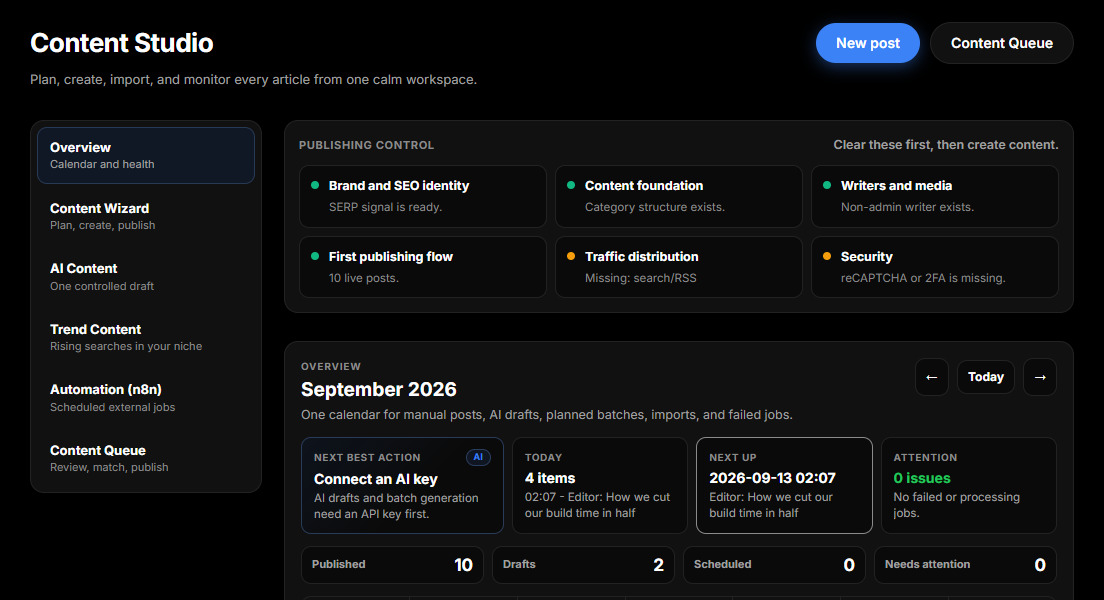
Today the type that matters is content_generation, written by Plan Many Posts and consumed over the API by an n8n workflow - see Bulk AI Generation. The Content Studio calendar surfaces those rows alongside content-queue items, so a failed batch is visible without touching SQL.
Worth knowing: the older admin/cron.php handler still exists on disk and understands several other task types. Nothing schedules it, and it is not the entry point to point your cron at. Use the cron.php in your install root.
Triggering a run yourself
From the command line, which is what a real cron job should do:
php /path/to/site/cron.phpOver HTTP, for hosts without shell access, the secret travels in a header rather than the URL - query strings leak into access logs, browser history and Referer:
curl -s -H "X-Cron-Secret: YOUR_CRON_TOKEN" https://yoursite.com/cron.phpThe token is the CRON_TOKEN constant in your config; the comparison is timing-safe. Without it the endpoint answers 403 forbidden and does nothing. External cron services (cron-job.org and similar) can send a custom header, which is all this needs.
There is also a keyless https://yoursite.com/cron.php?tick=1. That one is deliberately harmless: it is the address PseudoCron calls itself, it is throttled to once per minute behind a file lock, and it returns {"ok":true,"skipped":"real-cron"} without doing anything when a real cron job is already keeping the freshness flag warm. It is not a substitute for the authenticated trigger.
When something looks stuck
A CLI run prints a line per step, so the fastest diagnosis is to run it by hand and read the output:
php /path/to/site/cron.phpYou will see [cron 2026-09-13T…], then a line for each step that did something, then done. If instead you see skipped: previous run still active, a previous run is still holding the lock - usually a backup or a large mail batch, occasionally a stale lock after a hard kill.
If scheduled posts are the symptom, check the post's own scheduled_at and your site timezone under Settings → General → Localization before suspecting the scheduler. Timezone mismatches account for most "it published an hour late" reports.